Tizi House Design & Decoration
- 4.2
- Rating
- 1.00M
- Installs
- Free
- Price

 Analysis by App-foxy
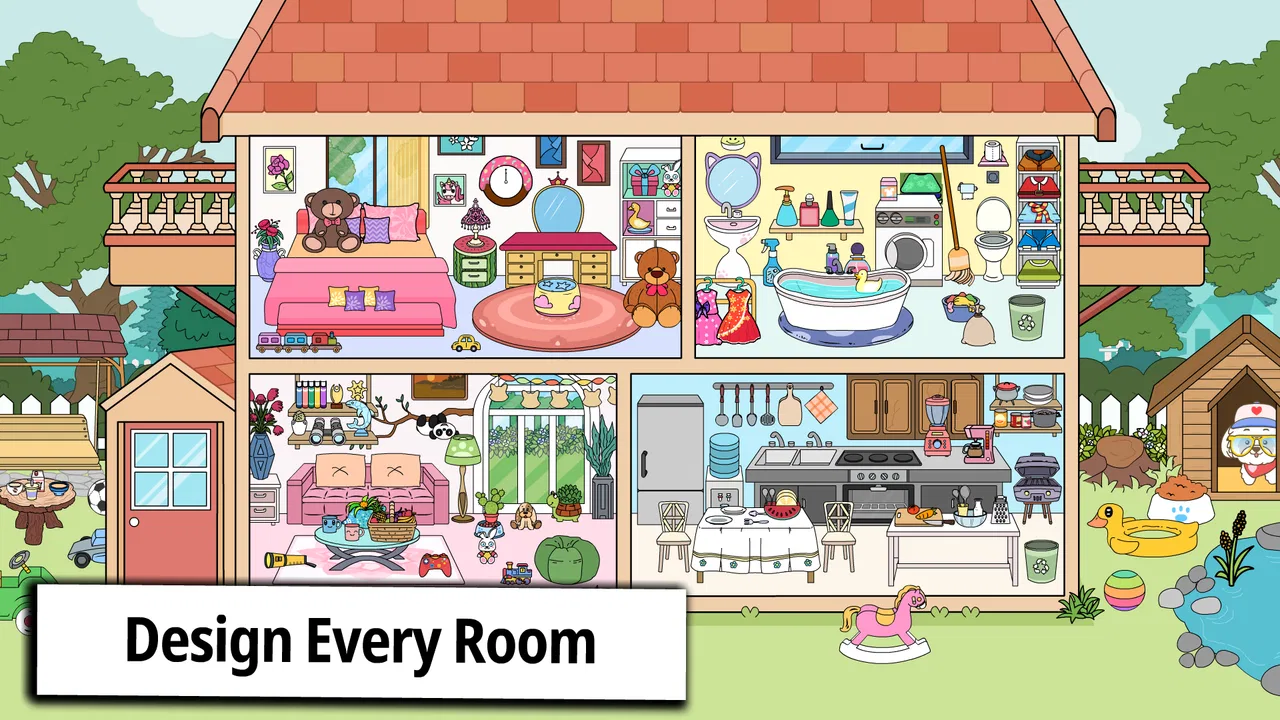
I found Tizi House Design & Decoration most appealing when I treated it as a small creative room rather than a conventional game with goals to beat. The idea is simple: I can shape a home, arrange a living room, work on a floor, and experiment with interior decor in a relaxed setting. That makes it easy to understand within minutes, especially for children who enjoy moving objects around and making a space feel personal.
After spending time with it, my opinion became more specific. The first session has plenty of charm, but the real question is whether the freedom to decorate remains interesting once the initial excitement fades. I think it can earn repeat visits for imaginative players, parents looking for a calm educational activity, and anyone who enjoys visual arrangement. It is less convincing for people who expect a deep building simulator, a detailed design tool, or a game structured around constant progress.
What the first week feels like
The strongest part of the experience is the low barrier to entry. I do not need to learn complicated rules before making something. The home-design theme gives the game an immediate purpose, while the room-by-room approach makes experimentation feel manageable. Instead of facing an intimidating blank project, I can focus on one area and see how small choices change the atmosphere.
You May Also Like

 Blood Strike: 2.5 Anniversary
Blood Strike’s Loadouts Turn Every Drop Into a Tactical Gamble
A close look at Blood Strike’s custom loadouts: how fast access to signature weapons reshapes its battle royale rhythm, rewards preparation, and narrows the gap between fights.

 Pandora - Music & Podcasts
Pandora’s Music Is Easy to Start, but Harder to Recover
Pandora’s strength is its low-effort path from a seed to a station. Its weak spot is how much confidence it asks you to place in connection, setup, and quiet recovery.

 8 Ball Pool
 Is Built on Rivalries, Rematches, and Routine
A close look at the rivalries, rematches, shared routines, and unanswered safety questions that turn a quick pool match into a persistent mobile community.

 Samsung Music
’s Quiet Strength Is Playing What You Already Own
Its reach comes less from spectacle than from dependable access to a personal library. That simplicity is both the app’s strongest retention engine and its ceiling.

 AccuWeather: Weather Radar
AccuWeather Review: A Quick, Clear Forecast for Everyday Decisions
For everyday plans, the best forecast is the one you can understand quickly. AccuWeather makes rain timing, radar, and local conditions easy to act on, with a few trade-offs.

 Hill Climb Racing
Why Hill Climb Racing Still Turns Crashes Into One More Run
A tiny car, a bumpy hill and one more upgrade: Hill Climb Racing keeps resurfacing because its simple chaos makes every near-miss feel personal.
More From Our News Desk



That simplicity is particularly useful for younger players. The game is listed for Everyone, and its educational category fits the way it encourages visual organization, personal expression, and basic decision-making. A child can try different arrangements without needing to understand technical design vocabulary. I can also imagine using it as a quiet activity after school, when a child wants something interactive but not overly competitive.
During the first week, the best way to use it is not to chase a perfect-looking home immediately. I prefer making one deliberately messy arrangement, then changing only a few objects at a time. That makes the effect of each decision easier to notice. Moving a prominent item, balancing an empty corner, or choosing a consistent mood can teach more about composition than rapidly filling every available space.
This is one of the game’s less obvious strengths: it turns small visual decisions into a gentle form of practice. A player can compare a crowded room with a more open one, notice how repeated colors affect the result, and learn that decoration is not just about adding more. The app never needs to present a formal lesson for those observations to become useful.
A practical scenario for families
Imagine a child has a short break before dinner and wants to play on a phone or tablet. A parent could offer a simple challenge: create a living room for a quiet reader, a playful family, or a guest who likes bright colors. The child then has a reason to make choices instead of tapping randomly. Afterwards, asking why a particular piece was placed in a certain spot turns a few minutes of play into a conversation about space, comfort, and preference.
I like this kind of use because it gives the game a purpose beyond passing time. It also avoids turning the activity into a test. There is no need to judge the result as right or wrong; the value comes from explaining the choices and trying another version. For siblings, comparing two different interpretations of the same room can be more entertaining than competing for a score.
Adults may enjoy the first sessions for a different reason. The decorating format is easy to pick up when I have only a few spare minutes, and it does not demand the attention that a story-driven game or strategy title usually requires. I can open it, make a few changes, and stop without feeling that I have abandoned a complicated task.
Still, the first-week appeal depends heavily on enjoying visual tinkering. If I want missions, character development, puzzles, or a clear sense of unlocking achievements, this is not the right kind of game. Its pleasure comes from arranging and imagining, not from overcoming increasingly difficult challenges.
How the developer’s approach affects the experience
Tizi Town Games has chosen an approachable presentation that puts the home itself at the center. That focus helps the game feel friendly rather than technical. I do not approach it expecting professional interior-design software, and that is important because the experience works best when I accept its playful scale.
The current version is 1.5.5, and the app runs on Android devices using version 7.0 or later. That makes it accessible to people who are not using the newest hardware, although the actual comfort of decorating will still depend on screen size and responsiveness. On a small phone, detailed placement can feel less natural than on a tablet, particularly when I want to inspect a room as a whole.
The game is free to start, with in-app purchases priced at $1.99 per item. That arrangement makes the initial trial easy, but it also changes how I evaluate the decorating loop. If a player becomes attached to a particular style and repeatedly encounters items that require payment, the sense of freedom can become less satisfying. Families should be aware of that before handing over a device, especially when a child is likely to experiment enthusiastically.
What remains useful after the novelty fades
By the time the first-week excitement settles, the game needs to provide a reason to return that is not simply “I have not decorated this room yet.” For me, that reason is the ability to revisit an arrangement with a different intention. A home can be made bright, calm, playful, minimal, or deliberately unusual, and each approach changes the creative task even when the basic interaction remains familiar.
This is where the app’s educational value becomes more visible. It encourages players to think in relationships: which objects belong together, where attention goes first, and how much open space a room needs. Those are modest lessons, but they can support visual confidence. A child who initially scatters everything may gradually begin grouping items or leaving breathing room simply because the result looks better.
I recommend setting personal themes to keep the activity fresh. One visit might focus on a comfortable living room, while another might use a limited color idea or try to make the floor feel connected to the rest of the home. These self-made rules create structure without pretending the game has a complex campaign. They are also a good way for parents to turn repeat play into a small creative exercise rather than passive tapping.
Another useful habit is taking a moment to compare the room before and after a major change. Players often add several decorations at once and then cannot tell which decision improved the result. Changing one element, stepping back, and reconsidering the balance makes the process more thoughtful. I found that this approach extends the life of the game because I am paying attention to the design rather than merely collecting visual changes.
Who is likely to keep opening it
The best long-term audience is made up of players who enjoy open-ended creation. Children who like dollhouse-style play may return because the home gives their imagination a setting. A parent may use it as a calm, screen-based alternative to louder games. Someone who enjoys arranging spaces but does not want a realistic simulator can also find a comfortable middle ground here.
It may also work well for collaborative play, even if the actual interaction happens on one device. One person can suggest a layout, another can choose the mood, and a third can decide which area needs attention. The game becomes a shared design prompt. That is a more durable use case than simply asking a child to occupy themselves with it, because conversation and cooperation add variety.
On the other hand, players who need measurable progression may lose interest. The usual alternatives in this broad category often provide puzzles, timed challenges, building systems, or a larger sense of advancement. Tizi House feels more like a creative sandbox. That means it is gentler and easier to revisit casually, but it may feel thin beside a game that rewards mastery or steadily introduces new mechanics.
I would also not choose it as a substitute for professional planning software. It is useful for imagining a playful room and discussing preferences, but it should not be treated as a precise way to plan a real renovation. The value is expressive rather than technical. Someone deciding on actual furniture dimensions, materials, or a complete floor plan will need a tool designed for those jobs.
The maintenance burden of keeping it interesting
The game is easy to maintain in the practical sense. I do not need to remember complicated systems, manage a growing inventory, or study a long tutorial every time I return. That makes it suitable for irregular play. A child can leave it for a while and come back without feeling lost, which is a real advantage over games that punish a long break.
The creative maintenance burden is different. Because the experience depends on the player supplying new ideas, it can become repetitive if every session follows the same pattern. I would not expect the app alone to generate endless motivation. To keep it fresh, I need to change the design brief, involve another person, or deliberately work on a different area of the home.
That trade-off is worth understanding before downloading. The game gives me a canvas, but it does not replace imagination. Players who enjoy inventing scenarios will see that as freedom. Players who prefer the app to provide a steady stream of objectives may see it as a lack of direction.
The free entry point helps with maintenance because there is little commitment required to test the experience. However, the per-item purchase model means the cost of expanding a preferred decorating style can become part of the decision. I would let a child explore the free experience first and discuss purchases clearly before allowing any transaction. The individual price is modest, but repeated choices can affect how open the game feels.
Where fatigue starts to appear
The main source of fatigue is repetition without a new creative question. Rearranging a room can be satisfying several times, but the action itself does not automatically become deeper with practice. Once I understand the basic rhythm, I need a reason to return. Without that reason, the game risks becoming something I admire briefly and then forget.
Another possible frustration is the gap between a player’s imagination and the available decorating choices. When I picture a very specific room, I may want an exact object, arrangement, or visual style. If the available options do not match that idea, the experience can feel limited even though the home concept is appealing. This is a normal limitation of a simplified creative game, but it matters for players who arrive with detailed design expectations.
Screen size can influence fatigue as well. Decorating on a phone is convenient, but repeated small movements may feel less comfortable than working on a larger display. A tablet is likely to make the home easier to survey, while a phone suits short sessions better. I would choose the device based on whether the player values portability or a clearer view of the whole room.
The app’s broad age appeal is helpful, but it also means the experience may seem too gentle for older players seeking complexity. An adult can enjoy it as a relaxing creative toy, yet I would not recommend it to someone looking for a full simulation with realistic constraints. The absence of pressure is a benefit for some users and the central weakness for others.
Purchases can create a second kind of fatigue: decision fatigue. If I am constantly considering whether a desired item is worth paying for, I stop thinking about the room itself. The most enjoyable sessions are the ones where decorating remains the focus. For that reason, I would set a clear spending boundary in advance and treat paid items as optional additions, not requirements for making a satisfying space.
Three ways to get more from each session
- Use a design brief before opening the room. Choosing a mood, resident, or purpose gives every placement a reason and prevents aimless decoration.
- Change one visual layer at a time. Work on the floor first, then the main furniture, then smaller decor. This makes it easier to see what improved the room and avoids an overcrowded result.
- Invite a second opinion. Ask another person to identify the room’s first focal point and one area that feels empty. That turns a solo decorating session into a practical lesson in balance.
These techniques do not add hidden game systems, but they do reveal more value in the systems that are already there. They also make the app easier to judge fairly. If it still feels enjoyable when I give myself a clear purpose, it has genuine staying power for that player. If it only works during unstructured novelty, it may be better as an occasional download.
My long-term verdict
Tizi House Design & Decoration earns a place on my device when I want a calm, accessible creative activity rather than a demanding game. Its strongest qualities are the friendly home theme, the immediate decorating appeal, and the freedom to make personal choices without pressure. The educational angle feels natural because organization, comparison, and visual expression emerge through play instead of being forced into formal exercises.
The game is especially suitable for children, families, and casual players who enjoy dollhouse-like creativity. The Everyone rating supports that broad audience, while the free starting point makes trying it straightforward. Its average rating is 4.2 from around 1.4 thousand ratings, and the app has passed one million installs, which fits the impression of a widely approachable title rather than a niche design experiment.
My recommendation comes with a clear condition: do not expect endless content from the basic act of moving decorations. The lasting value depends on whether you enjoy inventing themes, revisiting rooms, and discussing design choices. If you need missions, competition, realistic planning, or a deep progression system, a more structured alternative will probably serve you better.
I would keep it installed for a child who regularly enjoys creative play, particularly if a parent is willing to suggest small challenges and keep purchases controlled. I would be less likely to keep it permanently for myself if I had already exhausted the room ideas that interest me. In that sense, its maintenance is light but not automatic: the app stays fresh only when the player brings new intentions to it.
Overall, I see it as a pleasant creative sandbox with real repeat value in the right household, not as a complete interior-design simulator. Its best long-term feature is the freedom to turn a simple room into a personal project. When that freedom matches what you want, the game remains relaxing and useful after the first impression. When you need constant novelty or measurable progress, the same simplicity will eventually feel restrictive.
For my final judgment, I would recommend giving it a trial, exploring the free decorating possibilities, and deciding based on how often you naturally return to redesign a space. The developer, Tizi Town Games, has made an approachable educational game that succeeds most when it is treated as a creative habit in small doses. It does not need to become a daily game to be worthwhile; a thoughtful visit now and then can be enough.
FAQs for Tizi House Design & Decoration
01What is Tizi House Design & Decoration?
Tizi House Design & Decoration is a creative app that allows users to design and decorate virtual homes. It offers a wide range of furniture, decor items, and customization options to help users unleash their interior design skills. Suitable for all ages, it's a fun and engaging way to explore design creativity.
02Is Tizi House Design & Decoration free to download and play?
The app is free to download and offers several features at no cost. However, it also includes in-app purchases that provide additional items and customization options. These purchases are optional but can enhance the overall experience by unlocking exclusive content and features.
03Can I play Tizi House Design & Decoration offline?
Yes, Tizi House Design & Decoration can be played offline. Once the app is downloaded, users can access most of its features without an internet connection. However, some features, such as updates and in-app purchases, require an internet connection.
04Is Tizi House Design & Decoration suitable for children?
Tizi House Design & Decoration is designed to be family-friendly and is suitable for children. It offers a safe environment with no inappropriate content. Parents can feel confident allowing their kids to explore their creativity while designing and decorating virtual homes.
05What devices are compatible with Tizi House Design & Decoration?
Tizi House Design & Decoration is available for both Android and iOS devices. It requires a minimum of Android 4.4 or iOS 9.0 to run smoothly. It's recommended to have the latest OS updates for the best experience. Check the app store for specific device compatibility.
Pros
- User-friendly interface for all ages.
- Wide range of furniture and decor options.
- Encourages creativity and design skills.
- Regular updates with new content.
- Offline mode available for uninterrupted play.
Cons
- Limited customization for advanced users.
- Some features require in-app purchases.
- Occasional minor bugs during gameplay.
- Ads can be intrusive at times.
- No multiplayer or social sharing features.

Tizi House Design & Decoration
Gallery